
How do I add new Clickable Coverage® graphics to my website?
On the Forge website platform, our dedicated team works hard to create new Clickable Coverage® graphics and content pages talking about specific types of insurance products and coverage options.
You can leverage your Agency Revolution workspace and the Forge dashboard to review Clickable Coverage® graphics, as well as send a request for us to enable a new graphic on your site.
Navigate to the "Website" dropdown on the left sidebar of the workspace, and then select "Engagement Tools" from the list of options. Make sure you're on the "Clickable Coverage® tab."
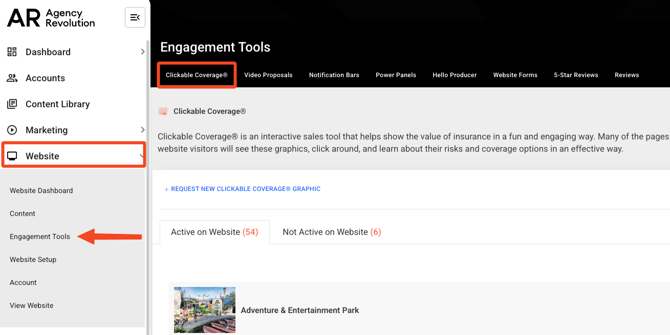
You'll see two tabs on the "Clickable Coverage®" page: "Active on Website" and "Not Active on Website." Click on the "Not Active on Website" option to see all the graphics we've released, that aren't yet enabled on your site.
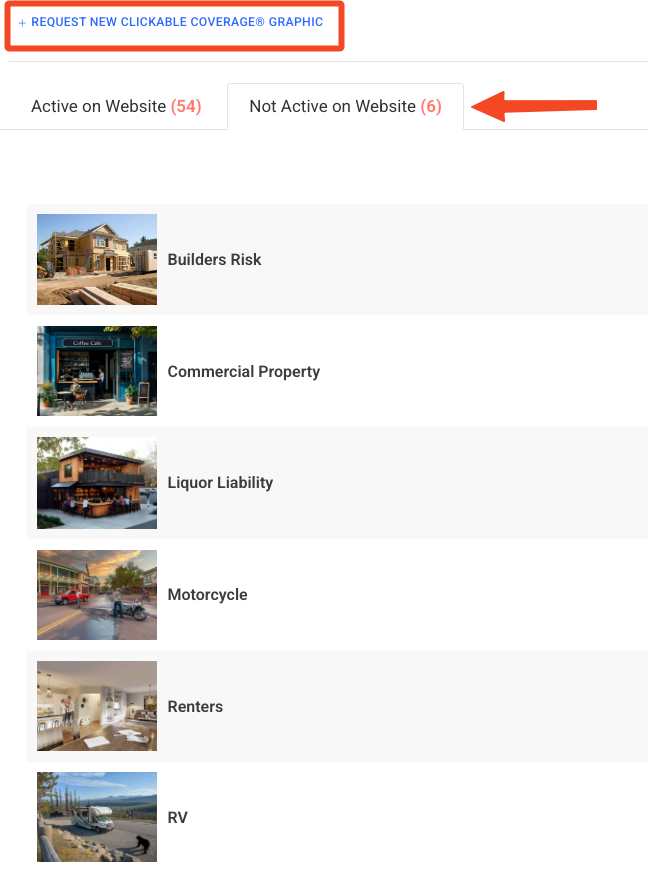
Scroll through the choices and decide if you'd like any of these graphics added to your Forge website. Simply click the blue "Request New Clickable Coverage® Graphic" button on the page to let our team know you'd like a graphic enabled on your website.