
There are times where Fuse will create accounts in the Account page of the platform, and those accounts will not exist in your management system. A great example of this is when a prospect fills out a Fuse form on your website.
Note: If you notice a disconnected account and the form fill should have been matched to an existing account, then you may have a sync issue. Check your Fuse alerts for more details!
What's the Definition of a "Disconnected Account?"
A “disconnected account” is defined as an account created in Fuse that doesn't exist in your AMS. This is an account created by Fuse, within Fuse, and thus is disconnected from your AMS. This can happen when:
-
A Fuse form is filled out using an email address that cannot be matched to any existing email address in your AMS data.
-
A lead is added into Fuse via Pipeline CSV Upload and the lead's email address cannot be matched to any existing email address in your AMS data.
-
You create a "New Lead" on the Pipeline page, and upon creating a new Contact for that lead, the email address for that lead cannot be matched to any existing email address in your AMS data.
Disconnected accounts are still included when building segments for your Fuse campaigns, including if you're using the AI Sidekick Segment Builder.
What Does a Disconnected Account Look Like in Fuse?
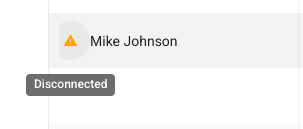
When you're scrolling through your account list, you may see a little orange alert icon to the left a client's name. Hover over it, and it'll let you know that this is a "disconnected account."
Can I Merge a Disconnected Account to an Existing Account Within My AMS?
Fuse does not support merging disconnected accounts with existing management system accounts, and for good reason! Fuse will not overwrite account information in your AMS.
Note: An account synced from your management system that is later deleted within your AMS does not become a disconnected account. A simple way to think of this is: Once a synced account, always a synced account.
If you have a disconnected account with information that should be used to create or update an AMS-based account, that account update should take place entirely within your AMS.