
How do I add team members to my website?
Team Members is a Forge feature that allows you to easily showcase your team on your beautiful Forge website. Each team member profile can include basic contact information (name, title, email, phone), a headshot, a bio, and even a LinkedIn profile link.
Navigate to the "Website" dropdown menu on the left sidebar within your Agency Revolution workspace. Select "Website Setup" and you'll find yourself on the "Team Member" tab. To add a new team member, simply click the "+ ADD TEAM MEMBER" button.
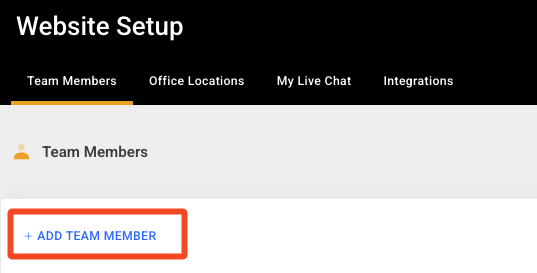
Go through the prompts to create your new team member, starting by entering their first and last name. On the following screen, you'll be able to input the headshot, bio, Hello Producer tag, and all relevant contact information.
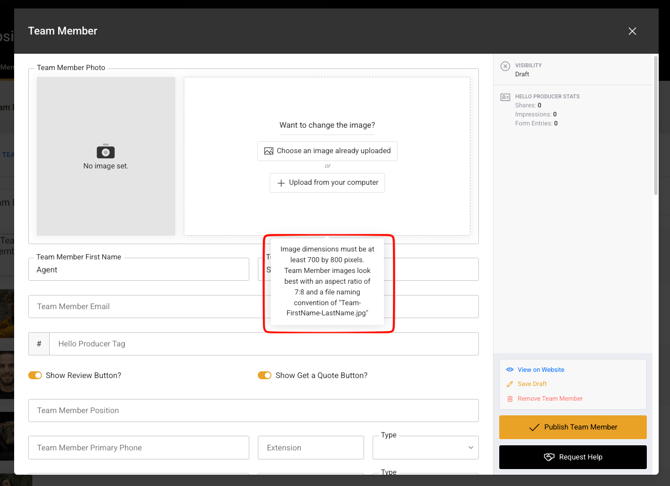
Once you're done adding the necessary information, click "Publish Team Member" on the bottom right of the screen.
💡 Important Note: Make sure to upload a high-quality image, sized at 700 x 800 pixels, for your team member headshots. As well, always name your images in the following naming convention "team-space-firstname-lastname."
You're also able to update and delete team members from the "Team Member" tab. Just be aware, if you're adding a team member onto your Forge website, you'll want to reach out to our team if you'd like them to be a user on the Forge website, allowing them to use the Agency Revolution workspace.
How to send us team information.
You can send us team information in any editable format, such as within the body of your email, in a Word document or Google Doc, and even within a spreadsheet. If sending headshots, be sure to send the highest quality image you have available and name each headshot file using the team member’s full name (example: Jane-Smith.jpg).
Manually copying team information from your old site.
If you’ve just signed up for Forge and would like us to manually copy and paste team information from your old website during the production process, we can do that as long as the old content is able to be copied and pasted. If the format of the old content is not able to be copied and pasted, we will need you to provide the information to us in an editable format so that we can add it to your new website.
If you’d prefer us to manually retype the information to bring it over to your new website, this might need to be scoped as a small, one-time project since we’ll need to dedicate additional resources to complete this work. Project cost and timeline will depend on the scope of work, which we will be able to provide before getting started.
Custom layouts for Meet Our Team and Team Member pages.
Forge is built on a series of best-in-class frameworks and foundational code. However, there are certain limitations in order to help preserve the integrity of the platform and your website.
Since creating custom layouts for the Meet Our Team and Team Member pages would impact the core Team Members feature that is part of the Forge platform, we can’t make this change without negatively impacting the platform and our ability to maintain your website long-term. This is why we’re not able to customize the layout or formatting of this feature.